Remote feels lonely.
You can go a whole day without hearing a teammate's voice. A status dot is not the same as company.
Everyone is a grey dot.
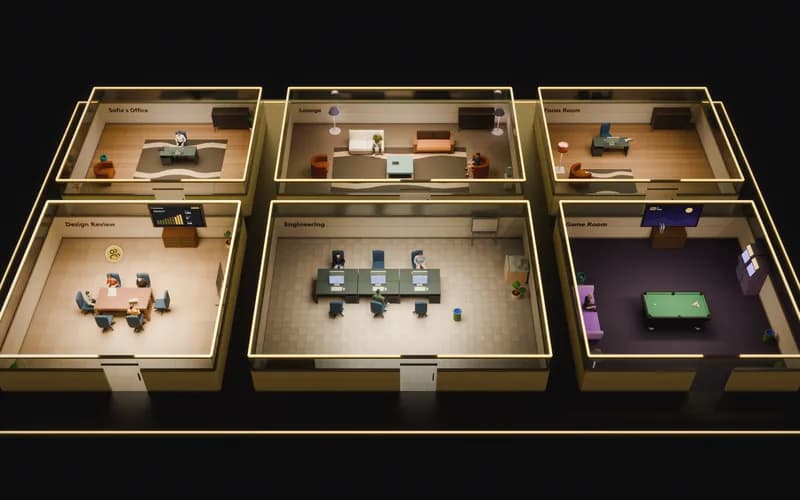
Remote Desk is a virtual office where the seat you take is the call you're in. Walk in and you're talking. Walk out and you're not.
Included: Virtual officeMeetingsAI minutesTasksDocsWhiteboardChatDriveAttendance
On the open floor. You can see everyone, and hear no one until you walk into a room.
Most remote teams don't need more meetings. They need a place where it's obvious who's around, and easy to just talk.
You can go a whole day without hearing a teammate's voice. A status dot is not the same as company.
A thirty-second question needs an invite, a link and a wait. So most questions never get asked.
Calls in one app, chat in another, then tasks, docs and files in five more. Context gets lost at every switch.
How it works
There's no join button and no meeting link. Sit down to join a room's conversation, stand up to leave it. Everyone walks in muted.
Step 1 · Outside
Walk the floor and see who's in which room. From the hallway, every conversation stays private.
Step 2 · Sit down
Take a seat and you've joined that room's call. Mic and camera start off, every single time.
Step 3 · Speak up
Turn on your mic, camera or screen share when you have something to add. Stand up to leave.
Private rooms
Private rooms stay locked. Knock, and the people inside decide whether to let you in.
Meetings, tasks, docs, whiteboards, chat, files and attendance share one sign-in, one set of permissions and one office to meet in.
Meetings & AI notes
Sit down in a room and you're in the call. Record it, and after the meeting you get a transcript and minutes, decisions and action items included.
MinutesENRegenerate
The team agreed the new pricing page goes live Thursday and split the remaining work between content and design.
Decisions
Action items
Tasks
Boards, sprints, epics and roadmaps for the work your team actually ships.
Sprint 4
12 to 26 Sep · 14 of 22 pts
Write the FAQ for the pricing page
Add FAQPage structured data
Draft the comparison table
Interactive floor demo
Docs
Spaces, nested pages, templates and version history, with full-text search across all of it.
Release checklist
Mei L.Linked to WEB-139
Every release follows the same steps. Tick them off here so the whole team can see where things stand.
Before you ship
Whiteboard
Sticky notes, shapes, frames and images, with everyone's cursor live on the board while you talk it through in the room.
Chat
Channels, DMs, threads, mentions, reactions and files. Every room carries its own channel, so the conversation stays attached to the place it happened.
design
8 members · the Design Review room's channel
Lucía Méndez17:21
Arjun Rao17:23
Amara Okafor17:25
Drive
Folders and shared drives, meeting recordings filed from the room, and a registry of every upload from every module.
DesignWebsite
6 membersAttendance
Room visits recorded as they happen, scoped to your organisation, with each person's local time beside their day. Reported, not surveilled.
Attendance
Tue 24 Sep · your time zone, London
Amara Okafor
6h 48m on the floorActivity timeline
Owners choose what is tracked.
Everyone picks the view that suits their machine and their mood. Rooms, seats and calls stay exactly the same in all three.
AI, built in
AI lives in the office instead of in another tab: a workspace for your models, a server your agents can connect to, and minutes for the meetings you choose to record.
Chat, compare models side by side, run research and make images with the providers your admins connect.
Any MCP client can read and update tasks and docs, with the same permissions as the person who connected it.
Transcripts become minutes: a summary, decisions and action items with an owner and due date.

Design Review32 min · Tue 17:15
Local time sits next to every name, and presence shows who's free to talk right now. No more guessing whether it's too late to call.

Lucía M.
Madrid · 18:42 local


Run Remote Desk in our cloud or on your own hardware. Either way, access is permission-based and every sensitive change leaves a trail.
Calls, chat, tasks, docs and whiteboards usually live in separate tools with separate logins. Remote Desk puts them on one floor, with one set of people and permissions.
Rooms, calls, recordings and scheduled meetings.
Instead ofZoomGoogle Meet
Floor channels, DMs and one-click direct calls.
Instead ofSlack
Sprints, boards, epics, worklogs and reports.
Instead ofJira
A team wiki plus every file your team shares.
Instead ofNotion
A live canvas for workshops and planning.
Instead ofMiro
Recordings, AI notes and daily presence timelines.
Instead ofLoomOtterToggl
Nine subscriptions become one sign-in, one set of permissions and one bill.
Compare plansProduct names are trademarks of their respective owners and are shown for comparison only.
Pricing
Meetings, recordings, AI notes, task boards and chat are on every plan. Tiers differ in limits and control, never in whether a feature exists.
For small teams trying presence for the first time.
$0per user / month
Free for up to 8 seats
For teams making the floor their daily workplace.
$6$8per user / month
Billed annually. $8 billed monthly.Billed monthly. $6 with annual billing.
For companies that need control, insight, and recall.
$11$14per user / month
Billed annually. $14 billed monthly.Billed monthly. $11 with annual billing.
Run the entire floor on your own infrastructure. Full feature set, Docker-based deployment.
FAQ
Can't find what you're looking for? A person on our team will answer.
Contact usThere are no links to send. Your team gets a floor plan with rooms, and the seat you take decides which call you're in. You can see who's around and join a conversation in one click, the way you would in an office.
No. Everyone enters a room muted, with mic and camera off. Only people in the same room can hear you once you unmute. The lobby and hallways carry no audio at all.
A room can be limited to certain people or protected with a password. Anyone else can knock, and someone inside decides whether to let them in. The server checks every seat, so nobody can listen in from outside.
Yes. A single VPS with Docker is enough for most teams: the media server, application server and reverse proxy ship as one compose stack, and we publish a full runbook.
Only when someone in the room starts a recording. Calls are encrypted in transit and are not stored otherwise. When a recording starts, everyone in the room is told and a recording indicator stays up until it stops. Transcripts and AI minutes are made afterwards, from the recording.
Available today: Web app, Windows desktop app, macOS desktop app and Android app (APK). iOS app coming soon. The web app runs in any modern browser, it's the same office on every screen, and the apps don't cost extra.
Yes. Claude or any MCP client can connect over a browser sign-in flow, with the same permissions as the person who connected it, to read and update tasks and docs. No password ever lands in an agent's config file.
Nothing breaks and nothing is lost. Moving to a paid plan keeps your floors, layouts, chat history and settings exactly as they are. During early access, plan changes are arranged with our team.
Get started
Set up your floor in minutes. Free for up to 8 seats, no credit card needed.
Or download the Windows app